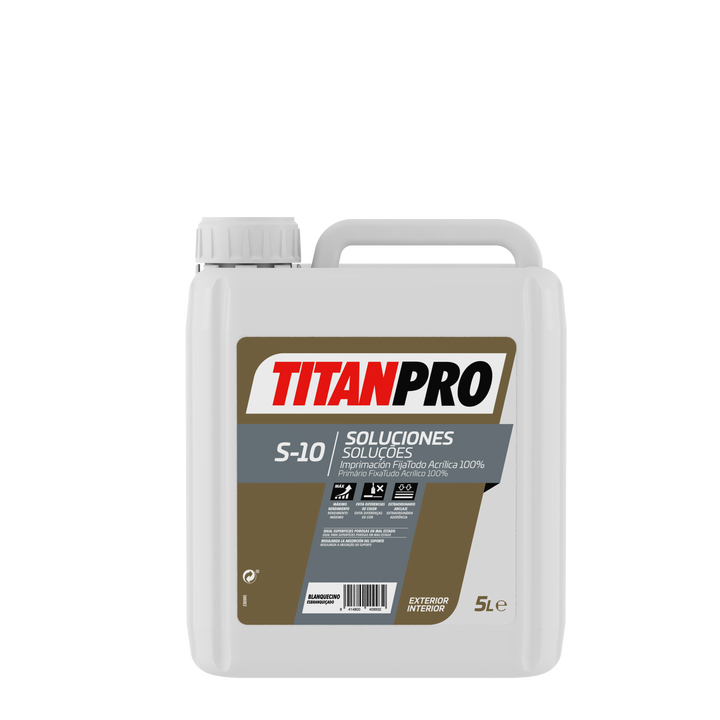
Titan Pro S10 — 100% Acrylic Fix-All Primer for Plaster and Porous Substrates
Couldn't load pickup availability
- Free Shipping +€90
- Returns/Refunds
- 24/7 Help Center

Ficha técnica
Ficha técnica
Shipping and returns
📦 Shipping and Returns Policy
🚚 Shipping
Free shipping based on destination and minimum order
- Spain (Peninsula): Free shipping on orders over €90
- Portugal: Free shipping on orders over €300
- Balearic Islands: Free shipping on orders over €500
- Europe (enabled countries): Free shipping on orders over €1000
Order processing
- Orders placed before 12:00h are processed on the same business day. Orders placed after this time will be processed on the next business day.
- Payments made by bank transfer will be processed once the amount has been received.
- The use of bank transfer is not recommended for urgent orders.
- All orders include a tracking number, which will be sent by email.
- Carriers: SEUR, CTT, UPS, Transaher or other logistics operators depending on availability and type of shipment.
Orders over 20 kg may be shipped palletized by specialized logistics companies.
Shipping methods
- Express Shipping: 24/48 business hours
- Fast Shipping: 24/72 business hours
- Economy Shipping: 48/78 business hours
- Pallet Shipping: 48/72 business hours (curbside delivery)
🕒 Deliveries are made from Monday to Friday, until 8:00 p.m., excluding weekends and holidays.
Delivery times and shipping agencies
The delivery times indicated on StockPinturas.com are merely indicative and do not constitute a contractual commitment, as they depend on the operation of external transport companies and circumstances beyond the control of StockPinturas.com, such as logistical incidents, route saturation, adverse weather conditions, or other force majeure causes.
For palletized shipments with curbside delivery, the usual delivery time is 48 to 72 business hours, provided the order has been correctly confirmed, prepared, and dispatched.
StockPinturas.com reserves the right to select the most appropriate transport agency based on the weight, volume, destination, and nature of the order, and may use different logistics operators without any modification to the sales conditions.
Possible delays attributable to the transport company will not give rise to compensation, order cancellation, or refund of shipping costs, provided the merchandise has been correctly dispatched from our facilities.
Delivery attempts
- In case of the recipient's absence, a second delivery attempt will be made.
- After two failed attempts, the merchandise may be deposited at the corresponding transport company's branch.
- If the order cannot be delivered due to reasons attributable to the recipient and is returned to the origin, shipping costs will not be refundable.
- If a new shipment is requested, the customer must pay the transport costs again.
📌 Some bulky or special products may be excluded from free shipping. In case of doubt, it is recommended to request a quote in advance.
Free shipping conditions
Free shipping applies only to standard products within the peninsula that do not require special transportation.
Some heavy, bulky, or palletized products (such as mortars, single-layer paints, large buckets, etc.) may not be subject to the free shipping promotion, even if the order exceeds the established minimum amount.
In these cases, transport costs will be calculated individually based on weight, volume, and destination, and will be communicated to the customer before shipment.
StockPinturas reserves the right to cancel the order and issue a refund if the customer does not accept the special transport conditions.
🔄 Returns
Return period
15 calendar days from receipt of the order.
Return costs
Will be borne by the customer, except in the following cases:
- Defective product
- Incorrect order
Return conditions
- Products unused, in perfect condition and with their original packaging.
- Manipulated, used or incomplete products will not be accepted.
- Returns of products on clearance or refurbished are not allowed.
Return procedure
- Send an email to info@stockpinturas.com
- Subject: Return (#order number)
- Indicate the reason for the return
- Include the order number
- Attach images in case of defective product
- Once the return is approved, the corresponding exchange or refund will be processed
💰 Refunds
Refund period
Up to 14 calendar days from receipt of the returned product.
Refund amount
- The total purchase amount (product and shipping costs) will be refunded only when the return is not voluntary.
- For voluntary returns, shipping costs will not be refunded.
Refund conditions
- The product must be in perfect condition.
- It is not mandatory to keep the original packaging, although its absence may imply a depreciation of the amount to be refunded.
❓ Frequently Asked Questions
How long will my order take?
The customer will receive a tracking link by email. The delivery time will depend on the selected shipping method, product availability, and correct payment confirmation. Most orders are prepared and dispatched on the same business day if placed before 13:00h.
About the product
Titan Pro S10 is Titan Pro's 100% acrylic all-purpose fixative primer — the universal anchoring base for preparing any porous, powdery, or weak substrate before painting. It consolidates the substrate, reduces absorption, and ensures optimal adhesion for the finishing paint. The essential preliminary step in renovation works and on new plaster or gypsum substrates. Available in 1 L and 5 L.
When is it essential to apply S10?
- ✓ New plaster and gypsum — highly absorbent, need consolidation before painting
- ✓ Powdery substrates — where rubbing the surface leaves white dust
- ✓ New plasterboard and drywall panels — to standardize absorption
- ✓ Renovations with disintegrated surfaces or old paints that have lost adhesion
- ✓ Before applying high-quality paints to ensure optimal performance
Why always apply S10 on new substrates
- ✓Penetrates deeply — consolidates the substrate from within — the low-viscosity formula penetrates the substrate and consolidates loose granules from the inside, creating a hard layer that anchors the finishing paint
- ✓Reduces absorption — prevents excessive paint absorption — without primer, highly absorbent substrates consume much more paint; S10 homogenizes absorption and reduces finishing paint consumption
- ✓Recycled packaging — sustainable commitment
Technical specifications
| Type | 100% water-based acrylic all-purpose fixative primer |
| Use | Porous interior substrates — plaster, gypsum, plasterboard |
| Formats | 1 L · 5 L |
Preview the color on your wall
Upload a photo, tap on the wall, and apply a HEX color. Approximate result.
- Sube una foto.
- Toca la pared para seleccionarla (añadir / quitar).
- Elige el color y ajusta la intensidad.